
UTM Parameters
Chapter 14 — UTM Tracking in Google Analytics 4

GA4 still reads UTMs to label where traffic comes from. Even though the UI changed, the mechanics did not. This chapter shows exactly where UTM data appears in GA4, how channel grouping uses your medium, how utm_id enables clean joins and cost import, and the GA4-specific traps that break attribution.
GA4 did not normalize case.
utm_source, utm_medium, utm_campaign, and utm_id are case-sensitive. Inconsistent case creates duplicates and misaligned reports.UTM fields appear in GA4’s Acquisition views
Your tagged links populate both session-level and first-user-level dimensions.
Traffic (latest session): Reports > Acquisition > Traffic acquisition
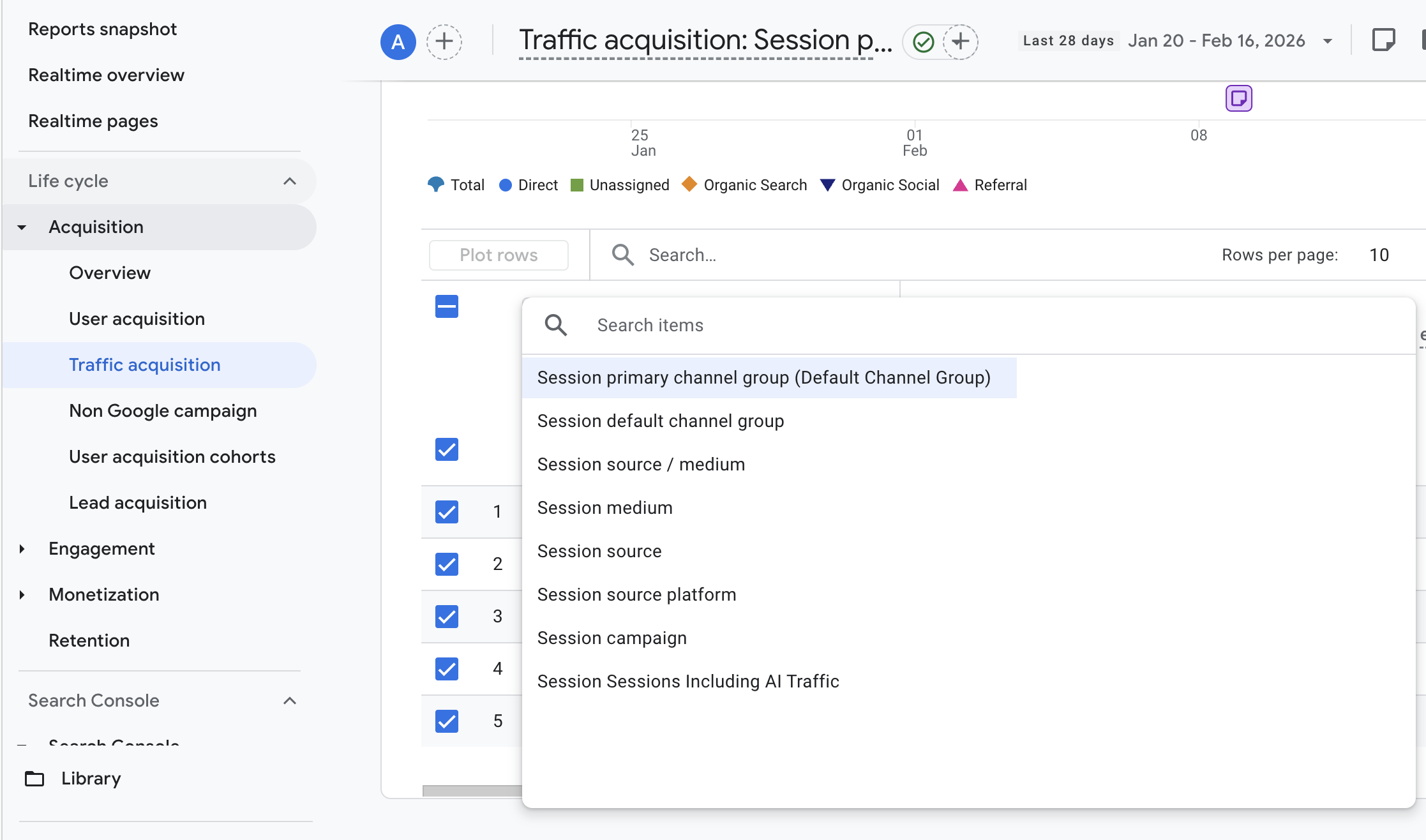
Primary dimensions include:
- Session default channel group
- Session source/medium
- Session source
- Session medium
- Session campaign
- Session campaign ID (when
utm_idis present)
First touch (first user): Reports > Acquisition > User acquisition
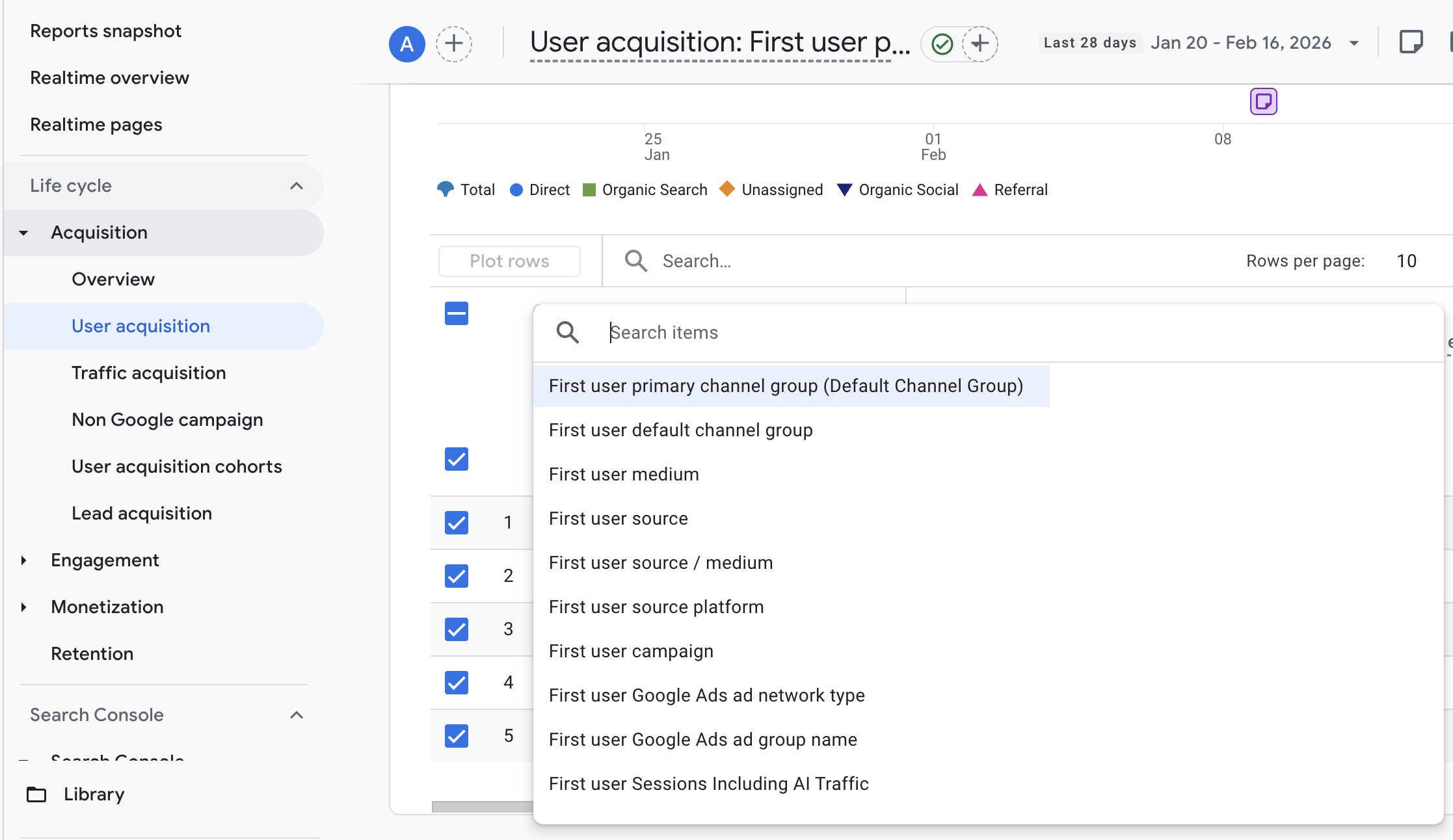
If a cybersecurity SaaS runs a LinkedIn lead gen ad with utm_source=linkedin, utm_medium=paid_social, and utm_campaign=wp_q2_2026, you will see linkedin / paid_social under Session source/medium and wp_q2_2026 under Session campaign. If that visit was the first ever for that user, the same values also appear in User acquisition under the First user … dimensions.
Mapping: UTM fields to GA4 dimensions
| UTM parameter | Typical GA4 dimension(s) it populates | Notes |
|---|---|---|
utm_source |
Session source, First user source | Case-sensitive |
utm_medium |
Session medium, First user medium | Drives channel grouping |
utm_campaign |
Session campaign, First user campaign | Case-sensitive |
utm_term |
Session manual term | Often only visible in Explorations |
utm_content |
Session manual ad content | Often only visible in Explorations |
utm_id |
Session campaign ID, First user campaign ID | Stable join key for cost/data import |
utm_source_platform |
Source platform | May require Explorations |
utm_creative_format |
Creative format | Often accessed via Explorations |
utm_marketing_tactic |
Marketing tactic | Often accessed via Explorations |
When a DevOps platform tags Google Display retargeting with utm_id=gd-rt-4821, add Session campaign ID as a secondary dimension in Traffic acquisition to validate the ID next to the campaign name.
What changed from Universal Analytics (UA) that affects daily work
| Area | UA | GA4 | Why it matters |
|---|---|---|---|
| Report layout | Acquisition showed Source/Medium and Campaign | Split: Traffic acquisition (Session…) and User acquisition (First user…) | You can compare first touch (demand capture) vs latest session (re-engagement) side by side. |
| Campaign ID | Limited use | utm_id is first-class for joins/imports |
Use utm_id to align spend and metadata with GA4 sessions. |
| Extra UTM fields | Not recognized | Supports utm_source_platform, utm_creative_format, utm_marketing_tactic |
Adds breakdowns for platform, format, and tactic without inventing new mediums. |
| Channel grouping | UA rules | New GA4 rules; unknown mediums → Unassigned | Non-standard mediums need a custom channel group to classify correctly. |
| Scopes | Mostly session-focused | Clean split between Session and First user | Expect different labels for first touch vs latest session in long sales cycles. |
Casing differences create duplicates
GA4 is case-sensitive for source, medium, campaign, and ID. Mixed casing fragments data and can break joins.
- Clean:
utm_source=linkedin,utm_medium=paid_social,utm_campaign=product_demo - Fragmented:
LinkedInvslinkedin;Paid_Socialvspaid_social;Product_Demovsproduct_demo
If an EMEA team uses utm_source=LinkedIn and NAMER uses utm_source=linkedin, Traffic acquisition shows two separate sources. This also sends mismatched source values downstream to your CRM or BI.
Practical fix:
- Standardize case at link creation time.
- If you capture extra parameters (e.g., creative_format) via a tag manager, send them in lowercase to avoid splitting.
utm_id in GA4 anchors cost joins and metadata imports
utm_id is GA4’s canonical campaign identifier. GA4 uses it to match imported cost and other campaign metadata from non-Google platforms.
- Where it appears: Session campaign ID and First user campaign ID
- Cost import path: Admin > Data collection and modification > Data import > Create data source > Cost data
- Your import file must include a Campaign ID that matches
utm_idvalues seen in GA4 for the same dates.
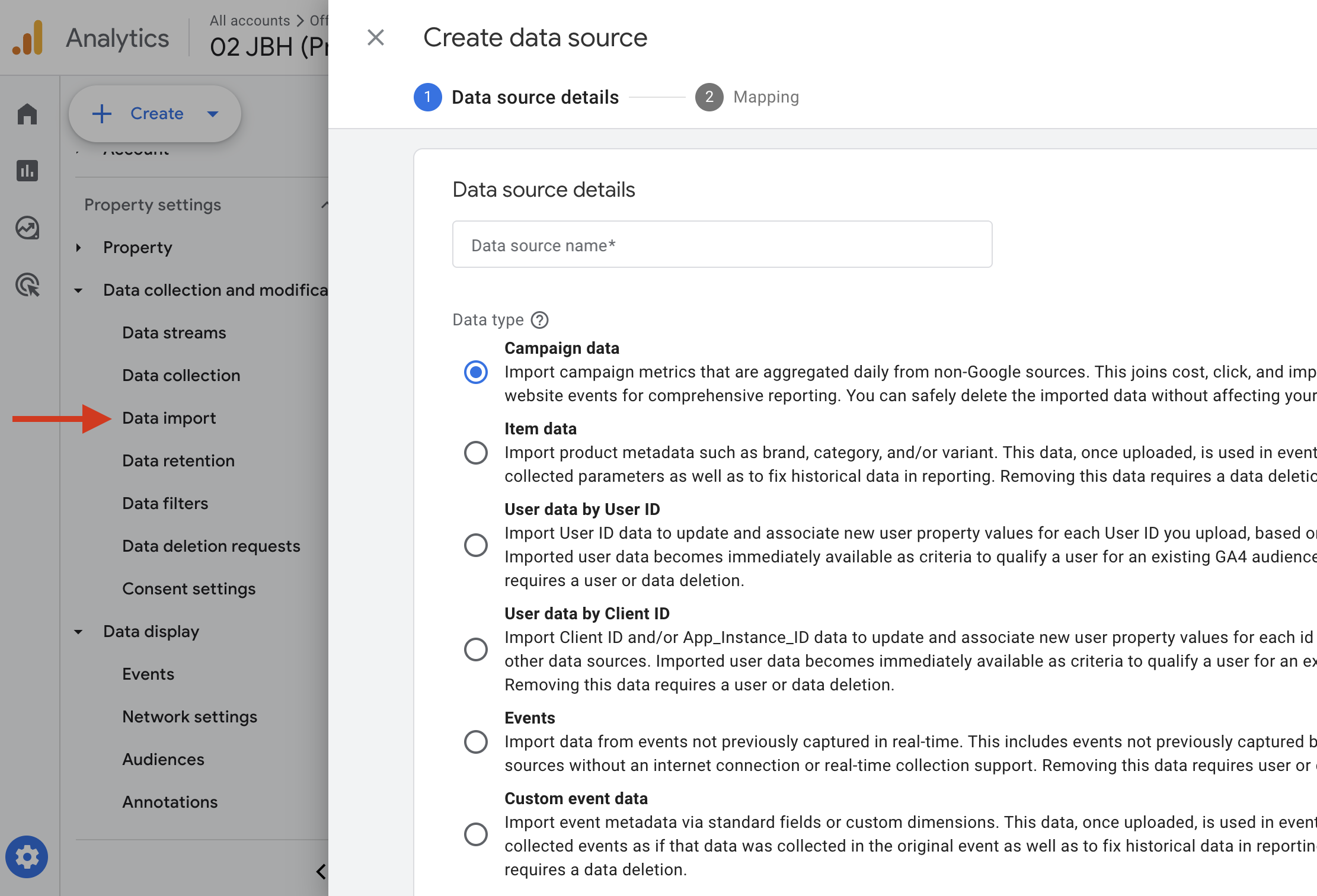
When a container security vendor sets utm_id=ln-abm-q2-101 on LinkedIn and utm_id=bing-brand-77 on Bing, they can import weekly CSVs (Campaign ID, Date, Clicks, Cost) and GA4 will align spend to the correct sessions. This unlocks ROI analysis in Explorations without waiting for a warehouse pipeline.
Notes:
- Keep
utm_idunique per campaign concept. Re-use the same ID only when you want to aggregate spend and performance across placements by design.
GA4’s extra marketing parameters: platform, format, tactic
GA4 recognizes these optional UTM fields:
utm_source_platform(e.g., linkedin, facebook, reddit)utm_creative_format(e.g., video, static, carousel, webinar, ebook)utm_marketing_tactic(e.g., abm, retargeting, expansion, nurture)
Where to view:
- Often visible as “Source platform,” “Creative format,” and “Marketing tactic” in Explorations. They may not be in standard Acquisition reports by default.
Make them report-friendly everywhere:
- Capture them as custom event parameters and register custom dimensions (scope: Event).
Simple setup via Google Tag Manager (web):
- Create URL Variables for
utm_source_platform,utm_creative_format,utm_marketing_tactic. - Add them as event parameters (e.g., source_platform, creative_format, marketing_tactic) on your GA4 tag or page_view.
- In GA4 Admin > Custom definitions, register each as an Event-scoped dimension.
If a data integration platform appends utm_creative_format=video or static, passing creative_format as an event parameter lets the team compare demo-start rates by format in an Explore, sliced by region.
Channel grouping rules depend on your medium
GA4 uses medium (and sometimes source) to assign a default channel group. Unknown or bespoke mediums land in “Unassigned” until you define custom rules.
Common mediums GA4 recognizes:
- organic, paid_search, display, paid_social, organic_social, email, referral, affiliate, audio, video
If you need custom mediums:
- Build a custom channel group to classify them.
Create a custom channel group:
- Admin > Data display > Channel groups > Create new channel group
Example rule:
- Channel “Paid Social ABM”: Medium equals paid_social_abm OR (Source contains linkedin AND Medium equals paid_social)
If an AI SaaS uses utm_medium=paid_social_abm, those sessions will show as Unassigned in the default view. A custom channel group immediately rolls them into Paid Social ABM so pacing and pipeline views stay accurate.
Specific GA4 pitfalls that break attribution
Untagged links inflate Direct
- Sales outreach tools, partner listings, and webinar platforms often miss UTMs. Those sessions fall into Direct and hide performance. An SDR dropping a Calendly link without UTMs will spike “Direct” on send days.
Bespoke or mis-cased mediums fragment or go Unassigned
- Keep mediums aligned to GA4’s list or classify them in a custom channel group.
Confusing first touch with latest session
- Traffic acquisition shows the session’s UTMs. User acquisition shows only the first touch. A user who first visited via Organic Search and later returned via Email will show Organic Search in User acquisition and Email in Traffic acquisition. That is expected.
Attribution model context
- Your GA4 attribution model distributes credit across labeled touches. UTMs supply the labels; the model assigns the credit. Deeper strategy sits in the multi-touch attribution chapter.
Find and validate your UTM data fast
Realtime spot-check
- Open a tagged URL in an incognito window.
- Go to Reports > Realtime and filter by Source/Medium to confirm labels.
Traffic acquisition deep dive
- Reports > Acquisition > Traffic acquisition.
- Toggle primary dimension between Session source/medium, Session campaign, and Session campaign ID.
- Add Landing page as a secondary dimension to validate campaign-to-page mapping.
Explorations for advanced splits
- Explore > Free form.
- Rows: Session source/medium and Session campaign (or Campaign ID).
- Columns: Device category, Country, or your custom dimensions (e.g., creative_format).
- Metrics: Sessions, Engaged sessions, Conversions.
If a payments platform runs the same utm_id across EMEA and NAMER (North America), placing Session campaign ID on rows with Conversions on values makes ROI comparisons across regions straightforward.
The two-lens GA4 model: Session vs First user
Use this mental model:
- First user lens answers “How did we first acquire this user?”
- Session lens answers “What brought them back this time?”
For long B2B cycles, expect different answers. Build both views to avoid false “channel cannibalization” stories.
Fast answers to GA4-specific questions
Do UTMs apply to app streams?
- Yes. Ensure links open the app or website consistently. App attribution details are out of scope here.
Do you need UTMs with Google Ads auto-tagging?
- Auto-tagging uses gclid. Coordination with UTMs is handled in the Auto-Tagging chapter. Use UTMs for non-Google traffic.
Are UTMs retroactive?
- No. GA4 records UTMs at session start. Changing links later does not rewrite history.
Lock in clean analytics with an ID-first workflow
Treat utm_id as the single source of truth. Keep a lookup (sheet or tool) that maps utm_id → campaign name, tactic, budget, region. Analyze in GA4 at “Session campaign ID,” then layer campaign names only for presentation. If you need those lookup fields in GA4, import “Campaign data” via Data import keyed on utm_id—this enriches reporting without relying on name stability.
Goal: Prove your GA4 property is reading UTMs and that utm_id appears where expected.
Steps (5 minutes):
1) Open an incognito window and visit your site with this pattern:
https://yourdomain.com/?utm_source=linkedin&utm_medium=paid_social&utm_campaign=test_ga4&utm_id=qa-001
2) In GA4, go to Reports > Realtime. Add a Comparison filter on Source/Medium to find linkedin / paid_social.
3) Click the event stream, confirm campaign = test_ga4.
4) Open Reports > Acquisition > Traffic acquisition. Change the primary dimension to “Session campaign” and then “Session campaign ID” to confirm “test_ga4” and “qa-001” appear.
Test your knowledge
Loading quiz questions...